Your first steps
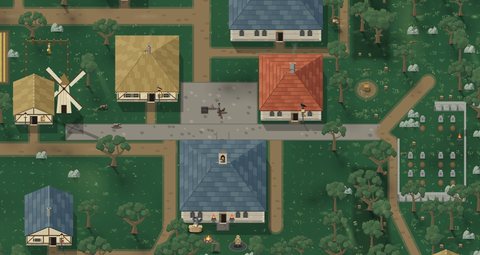
You begin in the temple yard of Kestrelby, at level 1, with a club, a jacket, a bag, two cheeses and 20 gold. The yard is a protection zone: no creature comes in.
In your first hour, five tips appear once each: walking, attacking, picking up loot, talking to a merchant and using stairs. The rats in the village square are your first prey; then go down the grate north of the temple into the sewers, with a torch in hand.
To choose where to hunt, open the big map: each area shows its level range, in green when it suits you. See the hunting grounds.
On a computer
- W, A, S, D or the arrow keys: walk. Your hero always faces the pointer, so you can walk sideways or backwards.
- Left button (hold): attack towards the pointer. A click on an NPC, a body or a bag uses what is there.
- Right button (hold): Sweep, a wide arc of a blow.
- 1: Mend, a heal. 2: Fire Bolt, a ball of fire. 3: Weapon Throw, hurls your weapon. 4: Haste, run 30% faster for 10 seconds.
- 5 and 6: use the item you dragged to those hotbar slots (a potion, food, a fishing rod or a rope).
- Space: dodge, with two charges.
- E: use whatever is nearest (a body, a door, stairs, a grate). F: pick up all the loot.
- I inventory, K skills, N map, L quest log, O the Auto window, B turns Auto on and off.
- Enter: chat. F1, F2, F3: offensive, balanced or defensive fighting. Esc: the menu, which pauses the game.
- The mouse wheel zooms the camera in up to three times.
On a phone
The game runs in your phone’s browser, sideways or upright. Tap Play to begin.
- Left thumb: a joystick that appears where you touch.
- ATTACK: the biggest button, on the right. Hold it to attack; it aims at the creature you tapped or the nearest one.
- DODGE: dodges, with two charges, like Space on a computer.
- The SPELL buttons sit around ATTACK when the phone is sideways, and in a row when it is upright.
- USE and LOOT appear only when they are needed. Holding LOOT loots every body in reach.
- INV, AUTO and MENU sit by the minimap. A tap on AUTO starts the hunt; holding it opens the Auto window.
- Tap the minimap to open the big map. Spread two fingers to zoom and drag to move.
- To put an item on the hotbar, hold it in the inventory, slide it aside and drop it on To 5 or To 6.
In Settings you can make the interface bigger or hide the on-screen controls.